My Tide Times Pro
- 4.8
- Rating
- 10.00K
- Installs
- $3.99
- Price

 Analysis by App-foxy
When I plan anything around the coast, a normal weather forecast is only part of the picture. Wind and rain matter, but the timing of the water can decide whether a beach walk is comfortable, a launch is practical, or a fishing spot is worth the trip. After spending time with My Tide Times Pro, I found it to be a focused weather app for people who need tide tables and tide forecasts rather than a broad dashboard packed with unrelated information.
That narrow purpose is its biggest strength. It comes from JRustonApps B.V. and has built a strong reputation, with a 4.8 average from around 1.8 thousand ratings. The app has passed 10 thousand installs, which makes it established enough to feel like a serious specialist tool without pretending to be a universal weather service. My experience was most positive when I treated it as a planning companion for coastal conditions, not as a replacement for every other forecast I use.
How the cost affects the value
The purchase is straightforward: the app costs $3.99, and it also lists in-app purchases at $0.99 per item. That makes the decision different from trying a completely free tide website or a general weather app that happens to show water information. Here, I am paying for a dedicated tide-focused product from the outset, so the useful question is whether I will check tidal information often enough to justify a separate app.
You May Also Like

 Pandora - Music & Podcasts
Pandora’s Music Is Easy to Start, but Harder to Recover
Pandora’s strength is its low-effort path from a seed to a station. Its weak spot is how much confidence it asks you to place in connection, setup, and quiet recovery.

 AccuWeather: Weather Radar
AccuWeather Review: A Quick, Clear Forecast for Everyday Decisions
For everyday plans, the best forecast is the one you can understand quickly. AccuWeather makes rain timing, radar, and local conditions easy to act on, with a few trade-offs.

 Hill Climb Racing
Why Hill Climb Racing Still Turns Crashes Into One More Run
A tiny car, a bumpy hill and one more upgrade: Hill Climb Racing keeps resurfacing because its simple chaos makes every near-miss feel personal.

 AliExpress - Shopping App
AliExpress Makes Global Shopping Feel Personal, but Shoppers Bear the Risk
AliExpress turns a global marketplace into a pocket-sized discovery engine. Its reach is useful, its shopping loop compelling, and its trade-offs easy to miss.

 Lords Mobile: Kingdom Wars
Lords Mobile Is a Kingdom-Building Routine, Not a Quick Match
A case-by-case verdict on the building, battles, device demands, and social commitments that make Lords Mobile rewarding for some players and exhausting for others.

 PDF Scanner app - TapScanner
TapScanner Makes Paperwork Easier to Capture, Check, and Share
TapScanner makes scanning with a phone feel less like a rescue operation and more like a dependable step in getting work done. Its capture tools are useful, though not flawless.
More From Our News Desk
View All News


I appreciate that the main price is easy to understand. A one-time purchase of $3.99 is a fairly small commitment for someone who regularly visits beaches, harbors, estuaries, or tidal rivers. At the same time, I would not recommend buying it simply because the price looks low. If I only need tide information once during a holiday, a local authority page or a free web service may be more sensible. The paid value appears when the app becomes part of a repeated planning routine.
The extra $0.99-per-item purchases deserve a moment of attention before buying. They mean the total cost can vary depending on what is offered and what a user chooses, so I would check the purchase screen on the device before assuming the initial price covers every possible addition. I would not build a budget around features that are not clearly needed. The sensible approach is to begin with the core app and only pay for an extra item when it solves a specific problem in your own coastal routine.
There is also an important difference between paying for convenience and paying for certainty. A tide app can make information easier to consult, but it cannot remove the effects of local weather, unusual conditions, access restrictions, or changes in the shoreline. I see the $3.99 as payment for a specialized reference tool and a smoother workflow, not as a guarantee that every outing will match the forecast perfectly.
A practical way to judge the purchase
I would divide potential users into three groups. Frequent coastal visitors will probably understand the value quickly because repeated checks save time and reduce the need to search through different pages. Occasional travelers may still like the focused format, but should compare it with free local sources first. People who rarely go near tidal water are unlikely to gain enough from a dedicated purchase, even if the app itself is well made.
The age rating is Everyone, and the minimum operating-system requirement is Android 8.0. That makes it accessible to many older Android devices, although anyone using a phone below that requirement will need to check compatibility before spending money. The current version is 26.3.1, so this is not an abandoned product sitting unchanged in an old store listing. I still recommend checking the app page on your own device, especially if your phone uses an unusual Android setup.
What the app is useful for in real life
The best way to use this app is before leaving home, not after arriving at the water. I might open it the evening before a morning beach walk, find the relevant coastal location, and compare the expected tide timing with the length of the walk. That changes the plan from “we will see what the beach looks like” to something more practical: start earlier, choose a shorter route, or visit a different area if the timing makes the original idea awkward.
For a small-boat owner or paddleboarder, the same habit can be more valuable. I would check the tide forecast alongside a separate wind forecast and then think about the return journey rather than only the launch time. A favorable tide at the start can become a problem later if the route depends on making progress against moving water. The app is useful here because it keeps the tidal question visible, while another weather source handles wind and precipitation.
One less obvious use is planning photography. Tidal movement can change the appearance of rocks, sandbars, pools, and narrow passages. If I want to photograph a particular stretch of shoreline, I can use the tide information to avoid arriving when the subject is covered or when access is uncomfortable. This is not about chasing a perfect number; it is about matching the water level to the kind of scene I want to see.
It can also help families avoid an unnecessarily frustrating outing. A child-friendly beach may feel spacious at one point in the cycle and cramped later. Checking the tide before packing lunch, chairs, and a change of clothes gives me a better chance of choosing a suitable time. The app does not replace common sense about waves or supervision, but it improves the basic schedule.
Three habits that make the information more useful
First, I would save or revisit the locations I actually use instead of repeatedly searching for a broad region. Tide behavior is local enough that a nearby place is not always a perfect substitute. A station that looks close on a map may represent a different harbor, inlet, or exposed shoreline. Using the most relevant location available is more important than relying on a familiar name.
Second, I would compare the tide timing with the complete plan, including travel, parking, setup, and the return trip. Many people check only whether the water is rising or falling at the moment they arrive. That is too narrow. The useful question is how the entire outing fits around the tide, especially if I am walking along a route that becomes difficult to pass later.
Third, I would avoid treating a tide forecast as a standalone safety decision. Atmospheric pressure, wind direction, storms, and local geography can affect actual conditions. My preferred workflow is to use this app for the tidal schedule, then consult a reliable marine or general weather source for wind and severe-weather information. That combination is more responsible than expecting one compact app to answer every coastal question.
Where it differs from ordinary weather apps
Most general weather apps are designed around temperature, rain, wind, and alerts. Tide information, when present, is often a secondary panel that I have to find after scrolling through several unrelated details. My Tide Times Pro feels more purposeful because the tidal question is the reason to open it. That focus is valuable when I already know what I need and do not want to sift through a full daily forecast.
The trade-off is that a specialist tide app is not automatically the best single app for a complete day outdoors. If my main concern is whether it will rain during a hike, I would choose a broader weather service. If I am making a serious boating decision, I would also want marine-specific information and local safety guidance. This app fits between those options: more relevant than a generic weather screen for tide planning, but not a substitute for professional navigation or comprehensive marine forecasting.
Compared with a free tide website, the advantage is mainly convenience and repeatability. A website may be perfectly adequate for a one-off lookup, particularly if it is operated by a trusted local organization. The dedicated app makes more sense when I check several places, return to the same locations, or want tide information to be part of my phone-based planning rather than a browser search. The value is therefore personal and behavioral, not something I would claim is automatically better for everyone.
Limitations I would consider before installing
The narrow focus can feel limiting if I expect a complete weather center. I would still keep another weather source for wind, rain, temperature, and alerts. That means some users will have to switch between apps, which is a small inconvenience on a casual beach day and a more serious workflow issue for anyone who wants one screen containing every relevant condition.
The paid model may also discourage people who are used to free weather tools. Even though $3.99 is modest, it is still an upfront decision, and the additional $0.99-per-item purchases make it worth reviewing the purchase options carefully. I would not buy it for a single trip without first checking whether a free local tide table already meets the need.
Another limitation is the risk of false confidence. A clean tide table can make a plan look more precise than it really is. The app can tell me when to pay attention to the water, but it cannot assess slippery rocks, strong currents, changing surf, closed paths, or whether I personally have the skills for a particular activity. For safety-critical decisions, I would treat it as one information source rather than the final authority.
Users should also think about how they travel. If I am often offline, abroad, or in places with poor reception, I would test the app in advance and make sure I understand what information is available when I need it. I would not wait until standing at a remote shoreline to discover that my preferred planning method depends on connectivity or a location search that is difficult to complete there.
Who should pay for it and who should skip it
I think the strongest audience is people who visit the coast often enough for tide timing to influence their plans. Walkers exploring tidal paths, anglers choosing when to reach a shoreline, photographers looking for exposed features, and recreational paddlers arranging launch and return times can all get practical value from a focused tool. For these users, the app can become a quick pre-departure check rather than another piece of information to hunt down.
It is also a good fit for someone who dislikes clutter. I would recommend it to a friend who wants a dedicated tide reference and already has a separate favorite for ordinary weather. The clear division of jobs is useful: this app handles tide planning, while the other service handles atmospheric conditions. That may sound less convenient than an all-in-one dashboard, but it can make each decision easier to understand.
I would be more cautious with occasional tourists. If the only planned activity is one beach visit, I would first look for a free and trustworthy local source. Paying $3.99 may still be reasonable if the app is easier to use and I expect to return to coastal destinations, but it is not an automatic bargain for a one-time lookup. The same applies to people who live far from tidal water and have no regular reason to consult tide tables.
Serious sailors and professional users should be selective. A tide-focused app may be a helpful reference, but I would not use it as the sole basis for navigation, passage planning, or decisions in hazardous conditions. Those situations call for official marine information, suitable charts, local knowledge, and equipment appropriate to the activity. The app is best understood as a convenient planning layer, not a replacement for those resources.
My buying decision
I would buy My Tide Times Pro if I regularly plan walks, fishing trips, photography sessions, or small recreational outings around the coast. The $3.99 price is easy to justify when I expect repeated use, and the focused purpose is more useful to me than a general forecast screen that treats tides as an afterthought. I would keep my normal weather app beside it and make decisions using both.
I would skip it if I need only one tide lookup, want a complete weather service in one place, or require professional-grade navigation information. In those cases, a free local source or a broader marine solution may be a better match. I would also review the optional $0.99-per-item purchases before committing, so the final cost matches what I actually intend to use.
Overall, I see this as a sensible paid specialist app rather than an essential download for everyone. Its value comes from repeated, focused use: checking the right location, fitting the full outing around the water, and combining the result with wind and safety information. If tides genuinely shape your plans, the dedicated workflow is worth paying for; if they rarely do, the purchase will probably sit unused.
FAQs for My Tide Times Pro
01What is My Tide Times Pro, and who is it designed for?
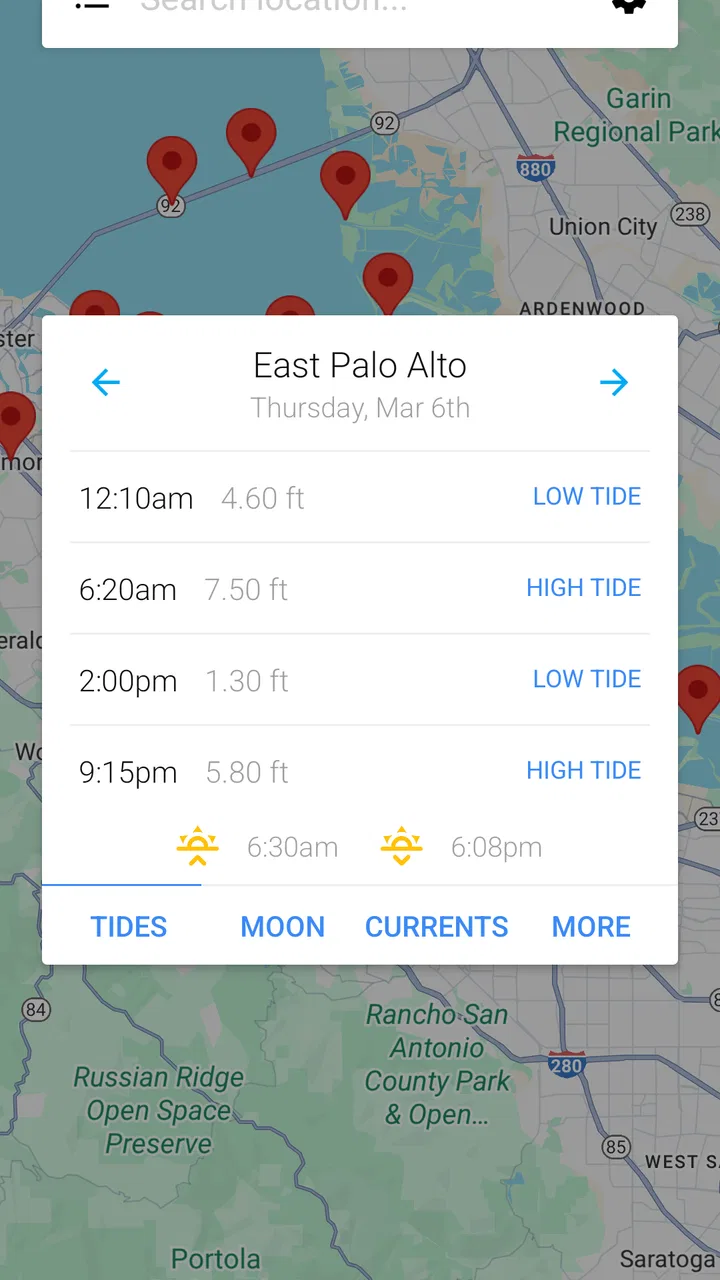
My Tide Times Pro is a tide-prediction app designed for people who spend time near the coast, including anglers, sailors, surfers, divers, beach walkers, photographers, and travelers. After selecting a location, you can check expected high and low tides, times, and tide heights in a clear daily view. It is most useful for planning activities, but it should be treated as a reference rather than a replacement for official marine information.
02Does My Tide Times Pro work without an internet connection?
The app can be useful when you are away from reliable mobile service, but offline behavior may depend on whether location data has already been loaded and saved on your device. It is sensible to open the relevant tide station before leaving home and confirm that its information is available. Weather conditions, station updates, and newly added locations may still require an internet connection.
03How accurate are the tide predictions in My Tide Times Pro?
My Tide Times Pro provides calculated tide predictions for selected coastal stations, making it convenient for everyday planning. However, predictions are not guaranteed to match real conditions exactly. Wind, atmospheric pressure, storms, local geography, river flow, and other factors can change observed water levels. For boating, diving, or safety-critical decisions, compare the app with official harbor authorities, coastguard information, charts, and local warnings.
04Can I use the app to find tide times for any beach or coastal location?
The app includes a database of tide stations and allows you to search for or select locations near the coast, but coverage can vary by country and region. A small beach may not have its own station, so the displayed information could come from a nearby location and may not represent local conditions perfectly. Always check the station name and distance before relying on the results.
05Is My Tide Times Pro free, and are there any important limitations?
My Tide Times Pro is a paid or premium version of the tide-information service, although the exact price, availability, and included features can differ between Android and iOS and may change over time. Before downloading, review the current store listing for supported devices, purchase details, and any optional subscriptions. Also check whether features such as extra locations, widgets, or notifications are included in your version.
Pros
- Accurate tide predictions with clear high- and low-tide times.
- Supports thousands of locations around the world.
- Useful tide charts make changing water levels easy to understand.
- Works well for planning fishing
- boating
- surfing
- and beach visits.
- Clean interface provides essential information without unnecessary clutter.
Cons
- Some locations may have limited data or less frequent updates.
- Advanced features require purchasing the Pro version.
- Weather and tide information can vary from actual local conditions.
- The app may feel overly specialized for users who rarely visit coasts.
- Location search can take time when browsing unfamiliar areas.

My Tide Times Pro
Gallery